How to set VAT up in ShipHero
ShipHero supports setting VAT registration type and ID via automation rules. Each shipment sent to Europe requires this information.
Note: For 3PL accounts, automation rules are set up on the child account.
- Go to app.shiphero.com > Orders > Automation Rules
- Select the + sign to create a new rule
- For shipments to a member country of the European Union, under Trigger select Country > In List > EU Countries.
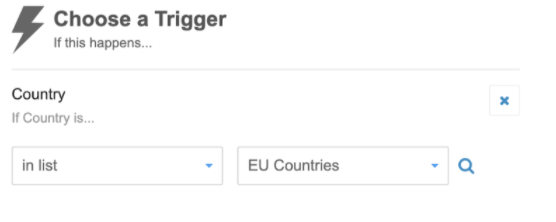
- Similarly, for shipments to the UK, change the Trigger to match the UK region instead. Options on the UK list include:
- GB
- England
- Northern Ireland
- NIR
- Wales
- Scotland
- UK
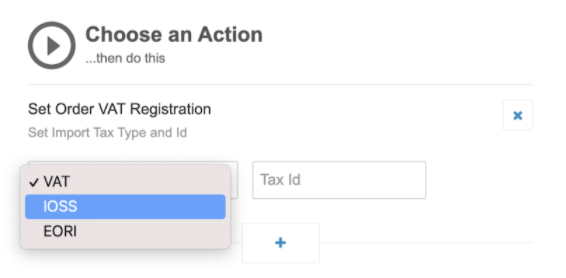
- Under Action, select Set Order Tax Registration > Import Tax Type > Tax ID.
The link to original item on ShipHero site: https://software-help.shiphero.com/hc/en-us/articles/4419353968141-How-to-Set-Up-EU-UK-eCommerce-VAT-Package-OSS-in-ShipHero